

OVENTRA Event
Take partner orders digitally at dealer meets and launches
OVENTRA Event lets partners order on their phones at dealer meets, distributor conferences, exhibitions and product launches, while your team watches the totals build on a live dashboard.

Why OVENTRA Event?
Dealer meets, distributor conferences and product launches are often where a brand's season is decided. Yet many events still rely on printed catalogues, paper order forms and spreadsheets consolidated after the event. Orders get re-keyed, product variants get mixed up, and the sales team spends the days after the event reconciling instead of following up.
OVENTRA Event is designed to bring structure to event-based ordering. It focuses on presenting products to dealers and distributors in a consistent digital format and capturing their orders during the event itself.
Because it sits within the OVENTRA360 ecosystem, event orders can be considered alongside wider order management and channel workflows, so the event becomes part of your ongoing business process rather than a separate exercise.
What changes
| The way it was | changes to | With OVENTRA Event |
|---|---|---|
| Paper order forms | Orders captured in the app | |
| Manual entry, line by line | Each order recorded the moment it is placed | |
| Article-code and size mistakes | QR-based product selection | |
| Spreadsheets consolidated after the event | One live dashboard during the event | |
| Reports that arrive days later | Event performance visible in real time | |
| Chasing confirmations | Partners confirm their own order before submitting |
One way of ordering for every kind of event
- Partner meets
- Regional distributor meets
- Product launch events
- Dealer conferences
- Trade exhibitions
- Sales conferences
OVENTRA partner meet at a glance
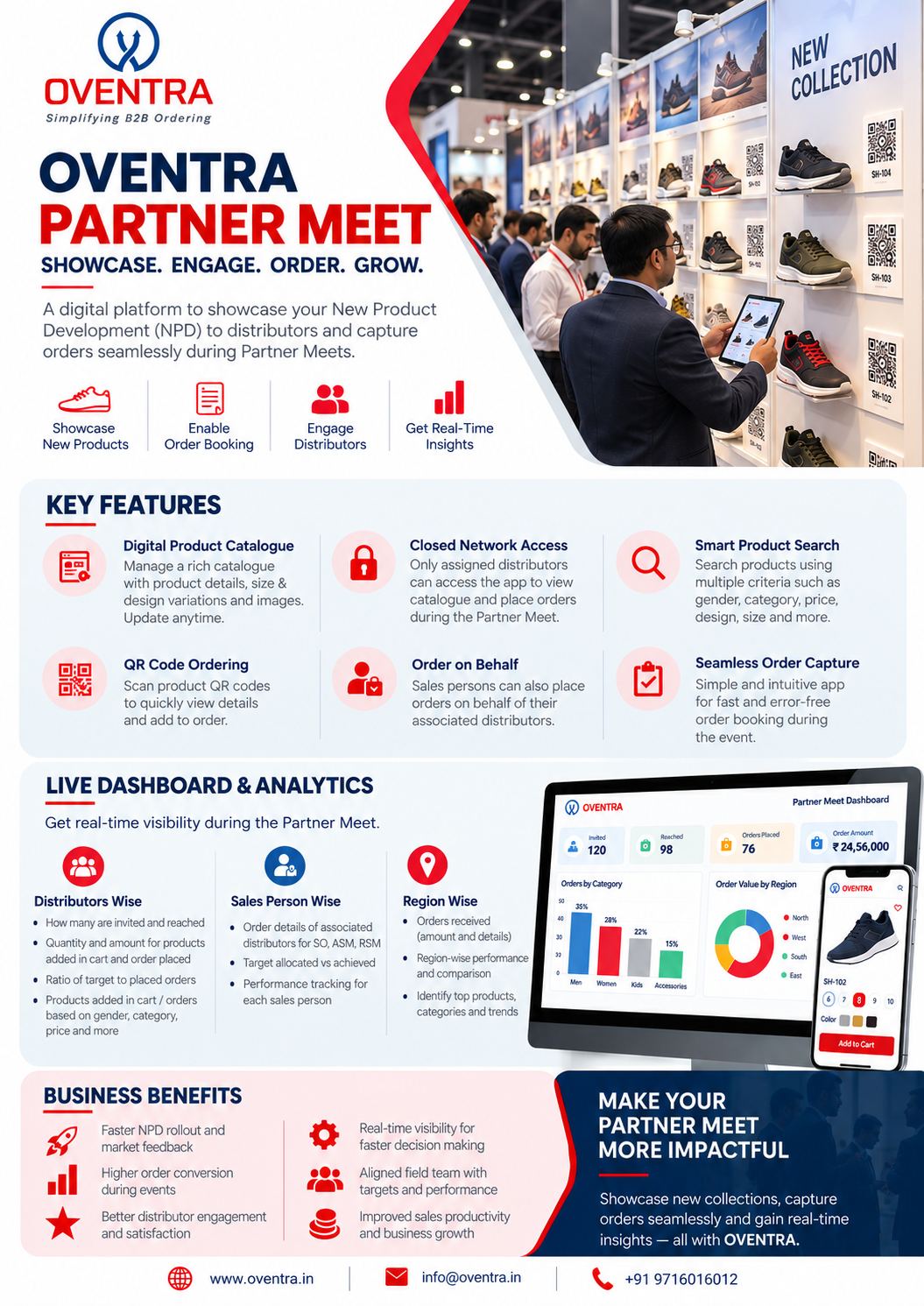
Showcase, engage, order, grow: a digital platform to showcase new products to distributors and capture orders during partner meets.
- Showcase new products
- Enable order booking
- Engage distributors
- Get real-time insights
Key features
Everything needed on the event floor.
- Digital product catalogueManage a rich catalogue with product details, size and design variations and images. Update any time.
- Closed network accessOnly assigned distributors can access the app to view the catalogue and place orders during the partner meet.
- Smart product searchSearch products by gender, category, price, design, size and more.
- QR code orderingScan product QR codes to quickly view details and add to the order.
- Order on behalfSales persons can also place orders on behalf of their associated distributors.
- Seamless order captureA simple, intuitive app for fast and error-free order booking during the event.
Distributor wise
Live dashboard during the meet.
- Invited and reachedHow many distributors were invited and reached.
- Cart and ordersQuantity and amount for products added to cart and ordered.
- Target ratioRatio of target to placed orders.
- Product mixProducts added to cart and ordered by gender, category, price and more.
Sales person wise
Live dashboard during the meet.
- Associated distributorsOrder details of associated distributors for SO, ASM and RSM.
- TargetsTarget allocated against achieved.
- PerformancePerformance tracking for each sales person.
Region wise
Live dashboard during the meet.
- Orders receivedAmount and details by region.
- ComparisonRegion-wise performance and comparison.
- TrendsIdentify top products, categories and trends.
Business benefits
- Faster new product rollout and market feedback
- Higher order conversion during events
- Better distributor engagement and satisfaction
- Real-time visibility for faster decisions
- Field team aligned with targets and performance
- Improved sales productivity and business growth
Capability areas
Select a capability to see what it covers. Specific features, configuration and availability are confirmed with the Oventra team during your demonstration.
Event-based ordering workflows
Structure ordering around a specific event, collection or launch rather than general day-to-day ordering.
- Partner meets and regional distributor meets
- Product launches and dealer conferences
- Trade exhibitions and sales conferences
Dealer and distributor engagement
Give invited channel partners a guided way to review products and place orders during the event.
Product presentation
Present catalogues, collections and product details in a consistent digital format.
- Digital catalogue with images, specifications, sizes, colours and pricing
- Collections and categories organised for the event
- Search by article code or name
Order capture during events
Record partner orders as they are made, reducing the need for post-event data entry.
Event-related business workflows
Prepare the catalogue and partner list before the event, and follow up on orders after it.
QR code ordering
Partners scan the QR code on a product display to open it in the app, then choose size, colour and quantity, no article numbers to write down.
- A unique QR code for each product on display
- Scanning opens the product with its images, article code, sizes, colours, pricing and packaging
- Fewer article-number, size and colour mistakes
Booking targets, schemes and coupons
Show each partner their order value and quantity against target, together with the schemes and coupons running at the event.
Live event dashboard
Follow total bookings, partner-wise orders, partners still to order and best-selling products while the event is running.
- Total bookings and booking value
- Partner-wise orders and partners still to order
- Best-selling products and categories
Order review and confirmation
Partners review their order by category, add remarks and confirm it before it is submitted.
ERP-ready order export
Export event orders in a structured format for your ERP or order-processing team.
Partner meet ordering, step by step
The five steps a partner follows to order at a meet, shown on real OVENTRA app screens. Scroll or use the steps to move through them.

Step 01 of 05
Begin your ordering journey
Browse products and track performance from a single dashboard. The partner searches by article code or name, sees the event's offers, and follows order value and quantity against target, with the scheme and coupon.

Step 02 of 05
Browse categories
The collection is organised into categories such as boots, casual, formal and sandals, so partners move quickly through a large range.

Step 03 of 05
Explore every product variant
On the product screen the partner enters quantities for each colour and size, with rates and carton quantities shown, then saves the selection.

Step 04 of 05
Review order before submit
An order summary by category shows ordered quantity and value. The partner checks it and adds remarks before submitting.

Step 05 of 05
Place orders
The partner confirms the order, which reaches your team instantly, and rates their experience of the meet.


How it works
A typical business workflow with OVENTRA Event. This is illustrative, your actual workflow is defined during discovery.
Step 1 of 5
Prepare the event
Define the event, the products or collections on show and the partners invited.
Step 2 of 5
Present products
Display the catalogue and product details to attendees during the event.
Step 3 of 5
Capture orders
Dealers and distributors place orders, with sales teams assisting where needed.
Step 4 of 5
Review event orders
The brand team reviews orders captured across the event.
Step 5 of 5
Hand over for processing
Event orders move into order management and follow-up, where connected.
OVENTRA Event: what it is and how it helps
Plain answers about OVENTRA Event (event ordering solution): who it is for, how it relates to other OVENTRA solutions, integration and how to see a demonstration.
What is OVENTRA Event?
OVENTRA Event is the event ordering solution in OVENTRA360, a connected business ecosystem for manufacturers and brands from Giga Soft Systems Private Limited. OVENTRA Event lets partners order on their phones at dealer meets, distributor conferences, exhibitions and product launches, while your team watches the totals build on a live dashboard. OVENTRA Event is designed to bring structure to event-based ordering. It focuses on presenting products to dealers and distributors in a consistent digital format and capturing their orders during the event itself.
Which businesses need OVENTRA Event?
OVENTRA Event is intended for manufacturers and brands that sell through dealers and distributors and hold dealer meets, distributor conferences, exhibitions or product launches. Typical users include brand and sales leadership, event and trade-marketing teams, sales representatives, dealers and distributors and order-processing teams. Industries that commonly explore it include Footwear & apparel, Electronics & electricals and FMCG & consumer goods.
How does OVENTRA Event support ordering at dealer meets and product launches?
OVENTRA Event structures ordering around a specific event, collection or launch. The brand prepares the event and the products on show, presents the catalogue consistently in a digital format, and dealers and distributors place orders during the event, with sales teams assisting where needed. The brand team can review orders captured across the event instead of consolidating paper forms afterwards.
What happens to orders after the event?
Event orders are handed over for processing and follow-up. OVENTRA Event can be explored together with OVENTRA OMS for event-based order capture and order processing, where the required connection is supported, and with OVENTRA DMS for the ongoing relationship with dealers and distributors.
How does OVENTRA Event relate to other OVENTRA solutions?
OVENTRA Event is designed to complement other solutions in the OVENTRA360 ecosystem: OVENTRA OMS, process and track orders captured at events through the order lifecycle; OVENTRA DMS, continue the relationship with dealers and distributors after the event; OVENTRA SFA, equip field teams to follow up with partners who attended. The connections that apply to your business are confirmed during discovery.
What integrations are possible with OVENTRA Event?
Product, collection and variant data can be assessed as an input from your ERP or item master. Captured event orders may need to reach your ERP or order-processing system, the method is agreed during discovery. Partner and price-list data are typical areas to evaluate for event ordering. SAP, Tally, BUSY, APIs and file-based exchange are integration discussion areas: compatibility, data scope, technical method, security and implementation effort are assessed during discovery, and no prebuilt connectors are claimed.
How can a business request a demonstration of OVENTRA Event?
Select “Enquire about OVENTRA Event” on this page to message the Oventra team at +91 97160 16012 with a pre-filled request about OVENTRA Event, or send a detailed enquiry through the contact form. Specific features and configuration are confirmed during the demonstration.
How OVENTRA Event connects
Select a related OVENTRA solution to see how it works with OVENTRA Event. The connections that apply to your business are confirmed during discovery.
OVENTRA EventOVENTRA OMS
OVENTRA OMS: order management solution
Process and track orders captured at events through the order lifecycle.
OVENTRA OMS brings orders from events, dealers, distributors and field sales into one place, where they are approved, processed and tracked to completion.
Explore OVENTRA OMSOVENTRA EventOVENTRA DMS
OVENTRA DMS: dealer & distributor management
Continue the relationship with dealers and distributors after the event.
OVENTRA DMS gives distributors and dealers their own app to browse the catalogue, check prices, schemes and stock, place orders and follow them, and gives you a view of the whole network.
Explore OVENTRA DMSOVENTRA EventOVENTRA SFA
OVENTRA SFA: sales force automation
Equip field teams to follow up with partners who attended.
OVENTRA SFA gives field sales teams one app for beat plans, visits, order booking and targets, and gives managers a clear view of what happened in the market each day.
Explore OVENTRA SFAWho uses it
- Brand and sales leadership
- Event and trade-marketing teams
- Sales representatives
- Dealers and distributors
- Order-processing teams


Working with your existing systems
If OVENTRA Event needs to exchange data with your ERP or other business systems, these are typical areas to assess. Compatibility, data scope, technical method, security and effort are confirmed during discovery.
- Product, collection and variant data can be assessed as an input from your ERP or item master.
- Captured event orders may need to reach your ERP or order-processing system, the method is agreed during discovery.
- Partner and price-list data are typical areas to evaluate for event ordering.
OVENTRA Event: frequently asked questions
What kinds of events is OVENTRA Event intended for?
It is intended for business events where products are presented and orders are taken, for example dealer meets, distributor conferences, exhibitions and product launches.
Can event orders flow into order management?
OVENTRA Event can be explored alongside OVENTRA OMS for event-based order capture and processing. Whether and how the two connect for your business is confirmed during discovery.
Do attendees need special hardware?
Device and connectivity requirements depend on how your event is run. These are discussed and confirmed during the requirement discussion and demonstration.
Can we use OVENTRA Event without other modules?
Businesses can explore modules according to their requirements. The team will discuss whether OVENTRA Event alone, or together with other modules, fits your process.
See OVENTRA Event with our team
Share your requirements and arrange a demonstration of OVENTRA Event (event ordering solution).